HTML: Learn what matters
If you are getting started with Web development then here's a refresher HTML for you, this is all HTML you need to get started.

Web Developer
INDEX
Making HTML file
Tags
Heading tags
Paragraph & break tag
Image tag
Anchor tag
div
id
class
1. Making HTML file
In the VSCode editor, html:5 is one of the boilerplates, the amount of code required for an HTML file. In your code editor first, make a file with the extension .html, for eg: index.html, in that file just type html:5 and press enter/tab.
<!DOCTYPE html>
<html lang="en">
<head>
    <meta charset="UTF-8">
    <meta http-equiv="X-UA-Compatible" content="IE=edge">
    <meta name="viewport" content="width=device-width, initial-scale=1.0">
    <title>Document</title>
</head>
<body>

</body>
</html>
2. Tags
Opening tag:<example>
Closing tag: </example>
2.1 Heading tags
h1 is big and decreases to h6 small
    <h1>hi</h1>
    <h2>hi</h2>
    <h3>hi</h3>
    <h4>hi</h4>
    <h5>hi</h5>
    <h6>hi</h6>
2.2 Paragraph & break tag
<p>Lorem ipsum, dolor sit <br> amet consectetur adipisicing.</p>
2.3 Image tag
alt="image", in case image not found it show text 'image'
<img src="<https://images.unsplash.com/photo-1471922694854-ff1b63b20054?ixlib=rb-4.0.3&ixid=M3wxMjA3fDB8MHxwaG90by1wYWdlfHx8fGVufDB8fHx8fA%3D%3D&auto=format&fit=crop&w=872&q=80>" alt="image">
2.4 Anchor tag (hyperlink)
target="_blank", so that the link opens up in new tab
<a href="https://www.google.com" target="_blank" >Google Homepage</a>
3. MOST IMPORTANT
3.1 div

Just consider the red box.
- div is a rectangle box with full width and height ZERO, when there is no content inside it. It means it appears to be nothing.
div height depends on its children's height. (children's total height = div’s height)
3.2 id
Applying attributes, defined by HTML.
💡Property: Properties are defined by the DOM, Document Object Model.
<p id = "one">Lorem ipsum dolor sit amet.</p>
<p id = "two">Lorem, ipsum dolor sit amet consectetur adipisicing.</p>
#one{
      color:red;
    }
#two{
      color: blue;
        }
Output:

3.3 Class
id name cannot be repeated. It can, but not the right way.
Therefore, class is introduced.
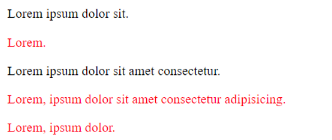
<p>Lorem ipsum dolor sit.</p>
    <p class="a">Lorem.</p>
    <p>Lorem ipsum dolor sit amet consectetur.</p>
    <p class="a">Lorem, ipsum dolor sit amet consectetur adipisicing.</p>
    <p class="a">Lorem, ipsum dolor.</p>
.a{
   color:red;
  }
Output:
If you've read it through and liked it then follow for more HTML, CSS and JavaScript content. Happy Coding!